If you already know what Polymarket is and want the practical beginner walkthrough, this is the page you need.
Short answer: using Polymarket means connecting a wallet, funding with USDC on Polygon, choosing a market carefully, reading the resolution rules, and only then placing a small first trade.
If you searched for:
how to use polymarkethow to trade on polymarkethow to bet on polymarkethow to play polymarket
this guide covers that same beginner workflow from start to finish.
This tutorial is for beginners who want the workflow in order without jumping between scattered help threads and partial explanations. It focuses on doing the basics safely.
If you need the brand/category context first, read What Is Polymarket? and What Are Prediction Markets in Crypto?. If the setup friction is specifically about deposits and wallets, read How to Fund Polymarket with USDC.
TL;DR
- Use CoinRithm to research markets before opening Polymarket.
- Connect a Polygon-compatible wallet.
- Fund with USDC on Polygon.
- Read the market question and resolution rules carefully.
- Start small and treat your first trades as learning trades.
What You Need Before You Start
| Requirement | Why It Matters |
|---|---|
| Polymarket access in your country | Access and legality are not the same question. Verify before funding. |
| A compatible wallet | Polymarket is wallet-based, not just email-and-password based. |
| USDC on Polygon | This is the core funding setup for beginners. |
| One simple market you understand | Your first trade should test process, not creativity. |
| Willingness to read the rules | Most beginner mistakes happen before clicking buy. |
Before You Start
Before you use Polymarket, understand what it is and what it is not.
Polymarket is:
- a prediction market
- crypto-native
- wallet-based
- funded with USDC on Polygon
It is not:
- a guaranteed-profit tool
- a place to skip reading rules
- a beginner-friendly replacement for doing basic market research
Best mindset:
- start small
- read carefully
- use the first few trades to learn process, not chase big wins
Quick Start Checklist
If you want the shortest possible answer to how to use Polymarket for beginners, follow this order:
- confirm Polymarket is available where you live
- connect a compatible wallet
- fund with USDC on Polygon
- choose a simple market you actually understand
- read the resolution rules before buying anything
- place a small first trade
- monitor the position and stay sized small while learning
Step 1: Research Markets Before You Trade
The cleanest beginner workflow starts on CoinRithm Prediction Markets, not inside Polymarket.
Why:
- you can browse active markets first
- you can compare categories
- you can see probabilities, volume, and context before committing
If you want the platform-specific research view, open the Polymarket profile. If you are deciding between platforms, use the prediction market comparison page. If access is your main question, check the availability overview. If you want the broader directory, use prediction market sources.
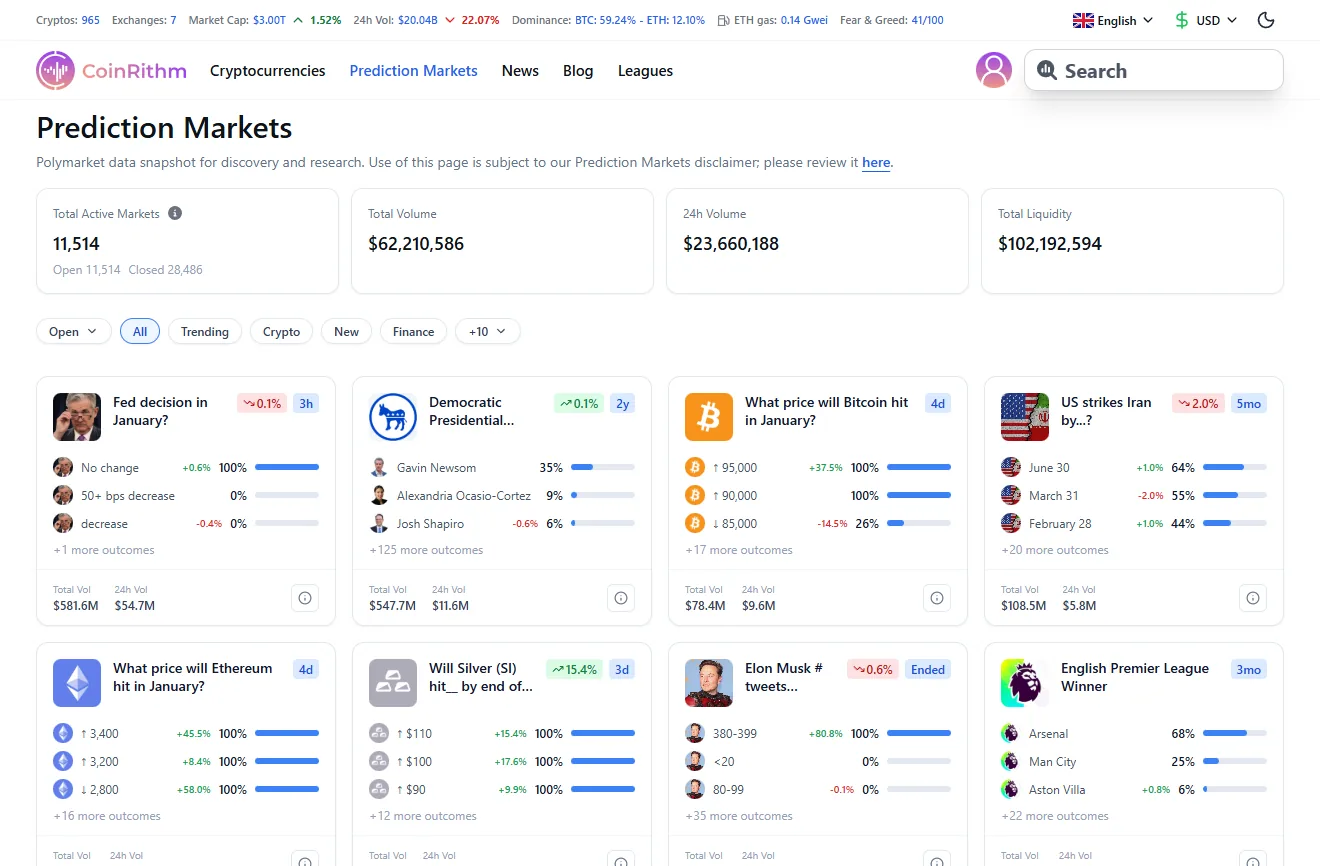
Use CoinRithm to narrow the market before you open a trade.
What to do:
- Browse the category you actually understand.
- Ignore markets you cannot explain clearly.
- Focus on liquid markets with clean wording.
- Open the market details and read the full question.
This is where many beginners avoid bad trades.
Step 2: Create or Connect a Wallet
Polymarket runs on Polygon, so you need a wallet that works with Polygon-based assets.
At a high level:
- Visit Polymarket.
- Click the wallet/connect option.
- Use a compatible wallet.
- Make sure you understand basic wallet security before depositing money.
Important beginner rules:
- never share your seed phrase
- double-check the network
- do not move large amounts until you understand what you are doing
If crypto wallets already feel confusing, slow down rather than pushing ahead.
Step 3: Fund with USDC on Polygon
Polymarket uses USDC for trading.
That means:
- you need USDC
- it needs to be on the correct chain
- you need enough for both your trade size and small network costs
Beginner-safe approach:
- start with a small amount
- only use money you are comfortable losing while learning
- make sure the wallet balance is actually usable before you try to trade
If your main question is actually how to deposit on Polymarket, go straight to How to Fund Polymarket with USDC.
If your main confusion is how costs work, read Prediction Market Fees Comparison. If your confusion is specifically about funding, read How to Fund Polymarket with USDC.
Step 4: Choose a Market
Now choose the market carefully.
Good beginner filters:
- you understand the topic
- the wording is specific
- the market has enough liquidity
- the question is not dependent on vague interpretation
Bad beginner filters:
- it is trending
- it is exciting
- people on social media seem confident
- it “feels obvious”
The best first market is usually:
- liquid
- simple
- clearly worded
- tied to an event you can follow
Step 5: Read the Resolution Rules
This is the most important step.
Do not trade before you read:
- the exact market question
- the resolution date
- the source used to determine the result
- any edge-case wording
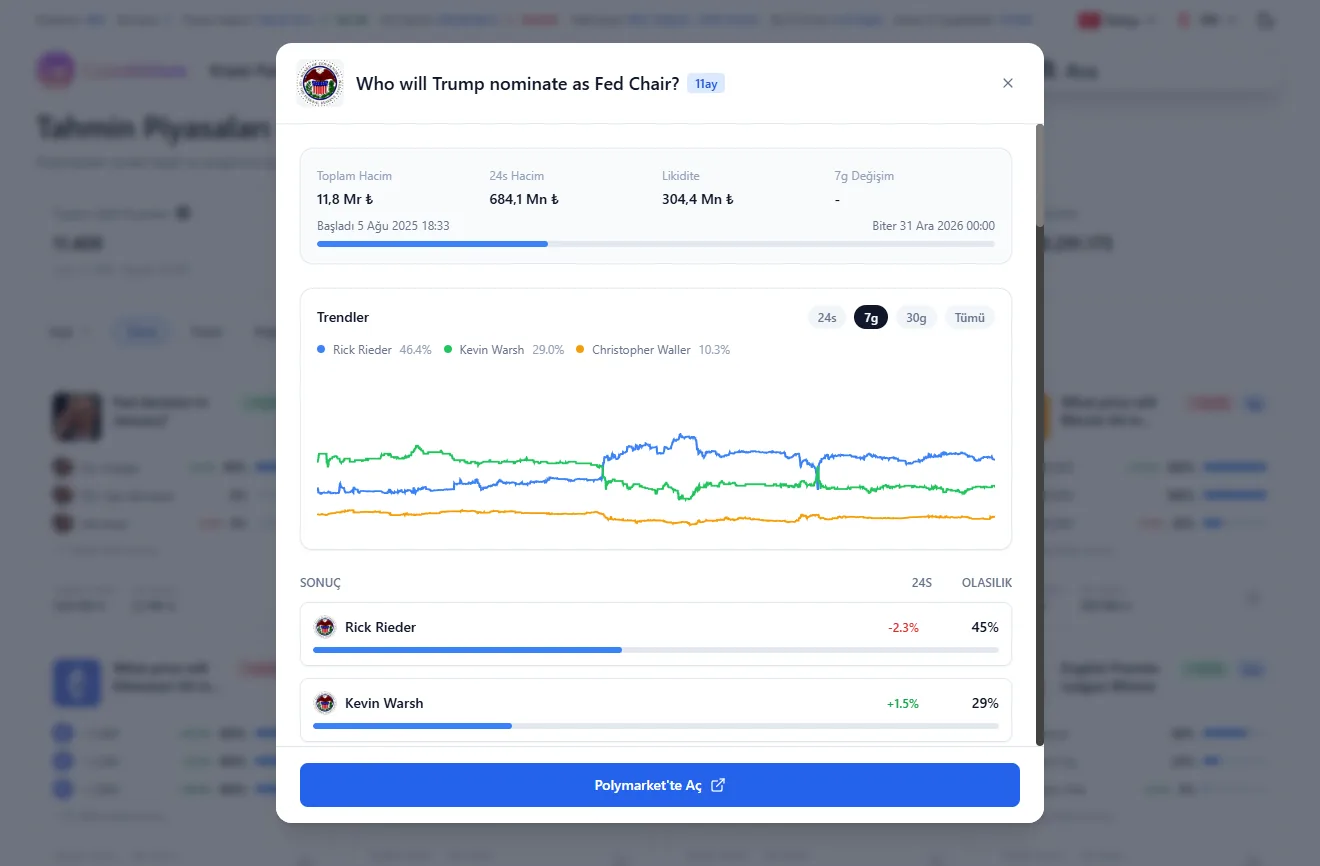
Read the resolution rules before you buy anything.
This is where beginners most often fail.
A market can look obvious, but the rules may define the outcome differently than you expect.
If you want the dedicated explainer on how price and probability work, read How Prediction Market Probabilities Work.
Step 6: Place Your First Trade
Once you understand the market and the rules:
- Choose the outcome you want.
- Check the current price.
- Decide how much you are willing to risk.
- Confirm the trade.
Simple beginner example:
- Buy
100shares at$0.83 - Total cost =
$83 - If the market resolves in your favor, the shares pay
$100 - Gross profit =
$17
That example is intentionally small because your first job is process, not aggressive sizing.
What to focus on:
- did you understand the rules?
- did you understand the price?
- did you size it appropriately?
- would you still be calm if the trade went against you?
Step 7: Track and Manage the Position
After the trade is live:
- watch price changes
- monitor the event itself
- keep re-checking whether your thesis still makes sense
You do not need to hold until final resolution every time.
You can often:
- sell early to lock profit
- exit early to reduce loss
That is useful because prediction markets are dynamic. The value often changes long before the event is officially resolved.
Common Beginner Mistakes
The short version:
- not reading the rules
- trading too large too early
- choosing bad markets out of excitement
- forgetting wallet, network, and fee friction
If you want the full mistake breakdown, read Common Prediction Market Mistakes.
If you are making your first few trades, the goal is not to be clever. The goal is to be careful and repeatable.
Frequently Asked Questions
Do I need crypto to use Polymarket?
Yes. In practical terms, you need a compatible wallet and USDC on Polygon.
How do I use Polymarket step by step?
Research a market, connect a wallet, fund it with USDC on Polygon, read the rules, place a small trade, and then manage the position carefully.
How do beginners start on Polymarket?
The safest beginner path is to start with one simple market, one small amount, and a full read of the resolution rules before trading.
What is the safest way to start?
Start small, use one simple market, read the rules carefully, and treat the first trades as practice.
Can I sell before the market resolves?
Yes. You can usually exit before final resolution if price moves in your favor or against you.
What should I check before every trade?
Check the question wording, resolution rules, current price, liquidity, and your position size.
Is Polymarket the best platform for everyone?
No. It is a strong fit for crypto-native users, but not always the easiest or clearest option for every beginner. If you want the head-to-head decision page, read Kalshi vs Polymarket.
Conclusion
Using Polymarket safely is mostly about process.
The basic order is:
- research the market
- connect the right wallet
- fund with USDC on Polygon
- read the rules carefully
- place a small first trade
- manage the position without emotion
If you follow that order, you avoid most beginner mistakes.
Start with CoinRithm Prediction Markets for discovery and research, then move to Polymarket only after the setup and market choice make sense.
Next Step
Need the funding walkthrough? Read How to Fund Polymarket with USDC.
Need the bridge-specific setup? Read How to Bridge USDC to Polygon for Polymarket.
Need the access check first? Read Polymarket Countries and Availability.
Need the risk and mistake breakdown? Read Common Prediction Market Mistakes.
Last Updated: March 30, 2026
Disclaimer: This article is for educational purposes only and is not financial advice. Prediction markets involve real financial risk, and crypto-based workflows include wallet and network risk.